550 email bounce fix: full mailbox, wrong address or block
A 550 email bounce fix depends on the code that follows the 550. This guide shows how to read it, where to find the bounce when the client deleted it, and which fix belongs to which code.
On this page
- 550 only means the receiving server refused the message for good.
- The extended code (5.1.1, 5.2.2, 5.7.x) tells you the real reason.
- Codes starting with 4 are temporary: wait, do not fix.
- Check whose mailbox is full before raising any quota.
What does a 550 email bounce mean?
"My emails are bouncing." The client pastes text starting with 550 and asks what is wrong with the server. Sometimes nothing is. A 550 only means the receiving server refused the message permanently. The reason sits in the extended code after it, and the four common reasons need four different fixes: a mistyped address, a full mailbox, a failed authentication check or a blocked server.
Ask for the full bounce, not a screenshot of the first line. Read the extended code (such as 5.2.2) first: it is the more precise part. Answering before reading it is how teams end up changing DNS for a typo.
How to find a bounce in the delivery log
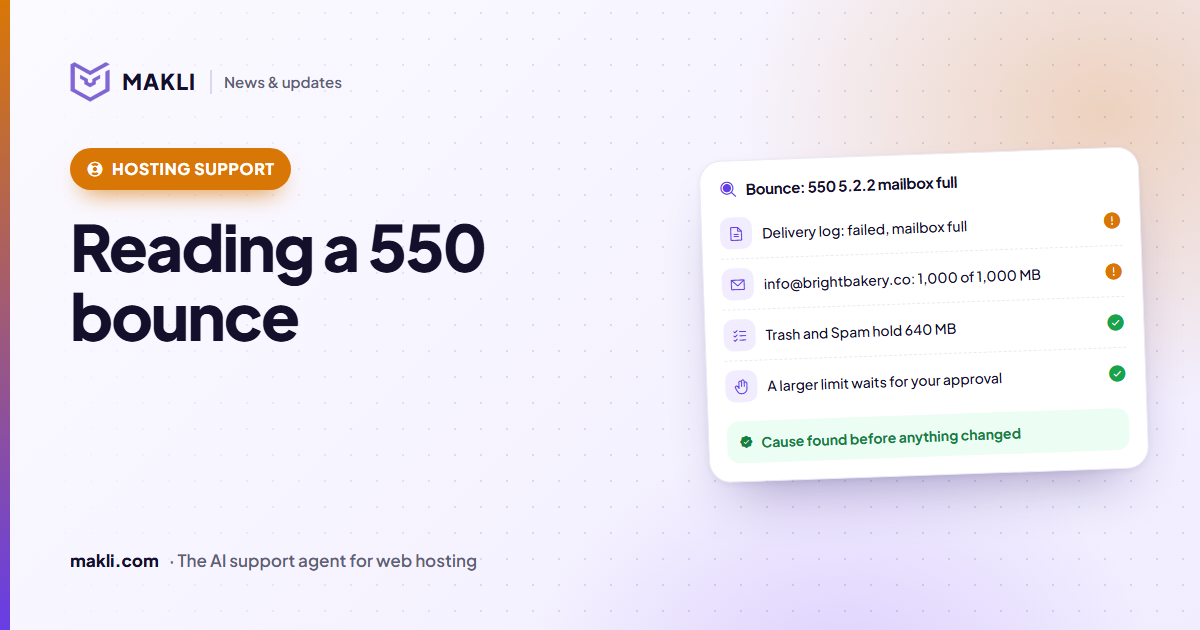
If the client deleted the bounce, the hosting account's delivery log usually has it. Makli reads it on cPanel (Track Delivery) and on DirectAdmin (the account's email log, 48 hours back by default and up to seven days). Each record shows sender, recipient, whether the message was delivered, deferred or failed, and the receiving server's reason.
Makli runs these look-ups as the client's own hosting account, so the panel limits the answer to that account's mail. It does not use cPanel's server-wide search, where one filtering mistake would show another customer's mail.
No record means the message never passed through this server: it was not sent, went out through another provider, or was refused before acceptance. Makli then asks for the bounce or the exact time and addresses instead of guessing.
550 email bounce fix by code
Extended status codes follow a public standard, so the same code means the same thing whichever server sent it:
5.1.1, "user unknown": the address does not exist. Check the spelling; nothing on the server needs fixing.5.2.2or552, "mailbox full": the recipient is out of space. See the next section.5.7.xnaming SPF, DKIM or DMARC (5.7.23,5.7.26): the receiver could not authenticate the sender. Makli runs its deliverability check, then fixes the record or gives the exact one to add.5.7.25, "reverse DNS": the sending IP has no matching PTR name. Your team sets that, so Makli hands the ticket over.554, "blocked" or "listed": the sending IP is on a blocklist. Handed to your team, because the cause, such as a hacked mailbox, has to be found.- "Relay denied" or "authentication required" from your own server: the mail app sends without logging in. Makli gives the exact mail app settings.
A code starting with 4 (421, 451, "greylisted") is temporary and senders keep retrying for hours. Those tickets need patience, not a fix. For the other mail checks on a cPanel account, see the cPanel overview.
How to fix a 550 mailbox full bounce
A full mailbox is the most common 550 on shared hosting. First check whose mailbox it is. If it is at another provider, the recipient has to free space. If it is your client's own, everyone writing to it gets the bounce.
On cPanel, Makli reads the quota and use. It calls a mailbox full at 99.5% and mentions it from 90%. It lists folders by size, largest first, and points out Trash, Junk and Spam holding space. Makli never deletes mail: the client empties those folders in webmail or their mail app.
If the mailbox needs more room, Makli can raise the limit on cPanel (within the plan's overall allowance) and DirectAdmin (in MB, not "unlimited"). Out of the box, that change waits for staff approval.
Mail missing but no 550 bounce
For a cPanel address, Makli also checks what quietly diverts mail: suspended receiving, messages held in the queue, a domain forwarder, filters, an autoresponder and the default address.
A common cause is routing. The MX points to Google or Microsoft, but cPanel still treats mail as local, so contact form mail lands in a forgotten mailbox on the server. Makli spots the mismatch and can offer to change routing, with your approval. Held outgoing mail after a spam incident is never released by Makli.
What Makli will not promise
Makli never promises inbox delivery and never invents sending limits. When the answer depends on your team, it hands the ticket over with the bounce and the checks it ran. You decide which actions run on their own; see pricing to try it on your own bounce tickets.
Frequently asked questions
What does 550 5.1.1 user unknown mean?
The recipient address does not exist on the receiving server. It is almost always a typo or an address that was deleted. Check the spelling with the sender. Nothing on your mail server needs to change, and changing DNS will not help.
How do I fix 550 5.2.2 mailbox full?
Find out whose mailbox is full. If it is at another provider, the recipient must free space. If it is your client's own mailbox, check its quota and the size of Trash, Junk and Spam folders, empty them in webmail, or raise the mailbox limit within the hosting plan.
Is a 550 bounce permanent?
Yes. Codes starting with 5 mean the receiving server refused the message for good and the sender will not retry. Codes starting with 4, such as 421 or 451, are temporary and the sending server keeps trying for hours.
Why are my emails bouncing with 550 5.7.1?
A 5.7.x code means a policy rejection. If the bounce names SPF, DKIM or DMARC, the receiver could not authenticate your domain, so check those DNS records. If it says blocked or listed, the sending IP is on a blocklist and the cause has to be found before delisting.